Wireless video streaming on your plotter
- Compact nautical camera that allows you to monitor the interior and exterior areas of the boat
- Wireless connection with your compatible plotter to view high-quality images directly on the screen
- Possibility of viewing the video on any other plotter on the same network
- Visible in environments in complete darkness; ideal for use in the engine room
- Simple installation and wired power with one-button configuration
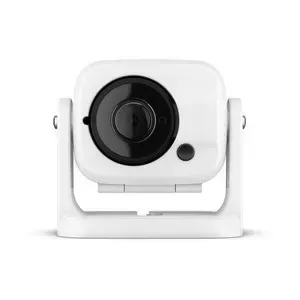
The GC 100 nautical camera is a simple solution that offers more safety and greater practical knowledge of the elements on deck, under deck and around the boat. This compact camera transmits high-quality video wirelessly so that you can view it directly on your compatible plotter or on any other plotter on the same network. You can link up to 7 cameras with the plotter and view content from up to 4 cameras simultaneously.
Installation anywhere
The GC 100 unit is effective in environments in complete darkness, so it is perfect for use in the engine room. With a simple installation and cable power, the camera will be ready for use thanks to the one-button configuration. Thanks to the compact and resistant design of the camera, the waterproof housing and the secure mounting bracket, you will have several options to install it practically anywhere on the boat.
Features:
- Wi-Fi®: integrated Wi-Fi connectivity
- Camera connection: Wi-Fi connection
- Power supply: by cable (10-30 V DC)
- Images: standard and inverted
- Night vision: integrated IR LED lighting (940 nm)
- Distance in night vision: up to 3 meters
- Viewing angle: 183° (diag.)/160° (horizontal)/90° (vert.)
- Image sensor device: 4.5 mm high-sensitivity Cmos
- Effective pixels: 1280 X 720 (720p HD)
- Exploration system: gelatin effect or rolling shutter
- Resolution: 1280 X 720 (720p HD)
- Video output: H.264 transmission via Wi-Fi
- Operating temperature: from -20 °C to +60°C
- Infrared spectrum: 940 nm
- Gain correction: automatic
- White balance: automatic
- Electronic shutter: automatic
- Backlight compensation: automatic
- Day/night operation: constant RGB mode
- Water resistance: IPX7
FAQs
Test the camera in your desired location to ensure proper functionality before permanently mounting it.
Charge the battery via the powered mount or a Micro-USB cable (not included) connected to the port behind the front cap.
The camera must be installed in a location where it is not submerged. This helps prevent water damage and ensures proper functioning.
Maintain a minimum distance of 10 cm (4 in.) between the camera and any compass to avoid interference.
Connect the red wire to the positive battery terminal and the black wire to the negative battery terminal for proper operation.
Green blinks: turning on. Red blinks: turning off. Blue blinks: connecting to chartplotter. Amber blinks: battery not charged to stream video.
The camera should be mounted so it does not present a hazard in doorways or walkways.
Hold the button for 3 seconds to turn off. Holding for more than 10 seconds will reset the camera to factory settings.
Contact the SailRACE team — as certified marine experts we’re happy to help with product selection, installation and after-sales servicing, before and after your purchase.